
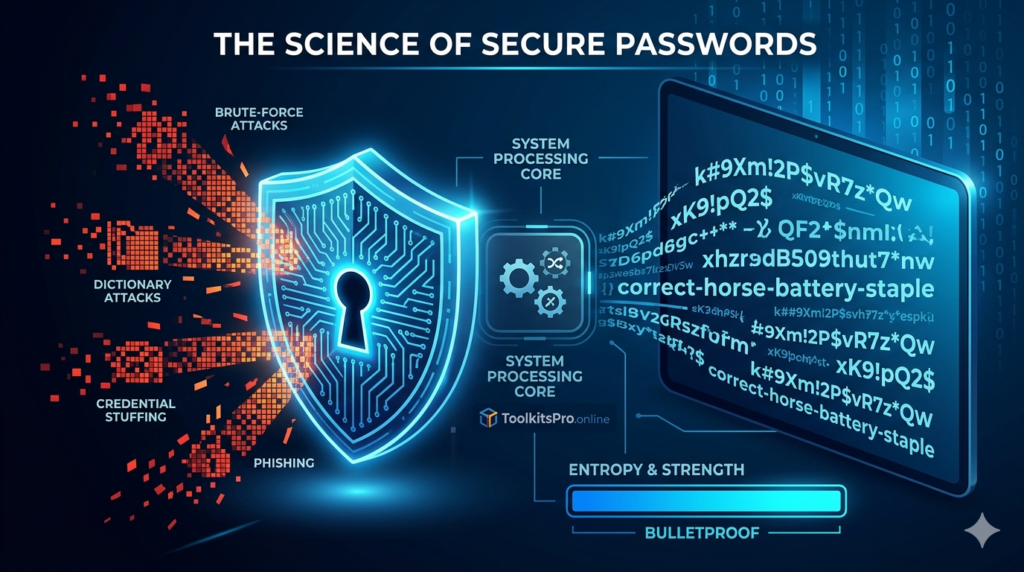
In the contemporary digital landscape, data has become the most valuable currency. Every transaction, personal conversation, financial log, and cloud credential is tied to an online account. Protecting these accounts is no longer a matter of basic digital hygiene; it is a fundamental aspect of personal security and corporate survival. Yet, despite the catastrophic risks associated with data breaches, corporate espionage, and identity theft, the single most critical point of failure for millions of users remains shockingly elementary: the password.
According to global cybersecurity research conducted over the past decade, weak, recycled, or easily guessable credentials account for over 80% of all hacking-related breaches. Users continuously fall into the trap of balancing memorability with security, resulting in variations of their names, dates of birth, or sequential characters like “123456” or “qwerty”. In an era dominated by automated cloud computing and quantum-adjacent brute-force mechanics, these human-engineered passwords offer zero protection.
To close this massive security vulnerability, security experts universally recommend transitioning away from human-created credentials toward algorithmic solutions. This is where a Secure Password Generator becomes an indispensable tool. This comprehensive, deep-dive guide explores the sophisticated mathematics, architectural design, structural mechanics, and practical applications of automated cryptographic generation systems, arming you with the knowledge to establish bulletproof defenses around your digital assets.
1. The Anatomy of Modern Cybersecurity Threats
To truly appreciate the necessity of machine-generated, high-entropy passwords, one must first dissect the methodologies used by modern threat actors to compromise credentials. Hackers rarely rely on manual guessing; instead, they deploy highly optimized software arrays capable of testing millions of combinations per second.
Brute-Force Attacks
A classic brute-force attack is an automated trial-and-error method where software attempts every conceivable combination of alphanumeric characters and symbols until it hits the correct sequence. The speed of a brute-force attack depends heavily on the hacker’s hardware configuration. Utilizing modern Graphics Processing Units (GPUs) or distributed cloud networks, attackers can execute billions of hashes per second. If a password is short or lacks complex character diversity, it can be cracked in less than a single second.
Dictionary Attacks
Unlike pure brute-force methods, a dictionary attack works systematically through a precompiled list of words, phrases, common substitutions, and previously leaked passwords. Hackers do not just feed standard language dictionaries into their tools; they use optimized text files containing millions of combinations harvested from historical data breaches. If your password relies on a standard dictionary word—even with common replacements like replacing an “s” with a “$” or an “a” with an “@”—specialized algorithms like Hashcat or John the Ripper will instantly isolate and decode it.
Credential Stuffing
Credential stuffing is one of the fastest-growing automated threat vectors globally. When a major website suffers a data breach, hackers do not just target accounts on that specific platform. Instead, they extract the exposed email-and-password combinations and feed them into automated bots that systematically attempt to log into hundreds of other high-value platforms simultaneously, including banking portals, email servers, e-commerce giants, and social media networks. If a user recycles a single password across multiple platforms, a single leak collapses their entire digital ecosystem like a house of cards.
Social Engineering and Phishing
Phishing remains an exceptionally common vector for data extraction. By mimicking legitimate service communications, banks, or corporate portals, attackers trick users into entering their credentials directly into malicious interfaces. However, when accounts are guarded by long, highly complex, randomly generated strings stored securely within a digital vault, the human ability to mistakenly memorize and accidentally type them into fake pages is significantly mitigated.
2. What Is a Secure Password Generator?
A secure password generator is a specialized cryptographic utility designed to eliminate human bias from the creation of digital credentials. It bypasses the natural cognitive patterns of the human brain—which inherently seeks familiar phonetic tracks, mnemonic layouts, and cultural references—and replaces them with pure mathematical randomness.
+--------------------------------------------------------------+
|                   AUTOMATED GENERATION LOGIC                 |
+--------------------------------------------------------------+
|  [ User Input Preferences ]                                  |
|         |---> Length Target: (e.g., 16 Characters)           |
|         |---> Character Pools: [A-Z], [a-z], [0-9], [!@#$]    |
|                                                              |
|  [ System Processing Core ]                                  |
|         |---> Cryptographically Secure Random Number Engine    |
|         |---> Deterministic Exclusion & Multi-Set Validation  |
|                                                              |
|  [ Final Balanced Output ]                                   |
|         |---> 100% High-Entropy Unique Key String            |
+--------------------------------------------------------------+
When you use a professional utility like the one deployed on ToolkitsPro.online, the engine pulls characters from specified arrays under strict structural conditions. A standard setup features four primary pools:
- Uppercase Characters:
ABCDEFGHIJKLMNOPQRSTUVWXYZ - Lowercase Characters:
abcdefghijklmnopqrstuvwxyz - Numeric Digests:
0123456789 - Special Symbols:
!@#$%^&*()_+~|}{[]:;?><
By combining these arrays and extracting characters dynamically using cryptographic randomizers, the engine creates highly complex strings that lack any semantic or contextual meaning, rendering traditional linguistic predictive models useless.
3. The Science of Randomness: PRNG vs. CSPRNG
Not all randomness on the web is created equal. To evaluate the integrity of a password generator, one must look at the underlying software architecture powering its random number generation.
Pseudo-Random Number Generators (PRNG)
Standard programming utilities often rely on basic pseudo-random number generators, such as JavaScript’s native Math.random(). These engines use deterministic mathematical formulas to calculate a sequence of numbers based on an initial starting value known as a “seed.” While PRNGs are fast and perfect for visual graphics or gaming mechanics, they have a major flaw: they are entirely predictable. If an attacker uncovers the seed value or observes a specific sequence of outputs, they can reconstruct the entire internal state of the algorithm and predict every single password generated by that system in the future.
Cryptographically Secure Pseudo-Random Number Generators (CSPRNG)
To ensure absolute cryptographic integrity, professional utilities use a Cryptographically Secure Pseudo-Random Number Generator (CSPRNG). These engines collect entropy directly from unpredictable hardware states, such as system clock fractions, mouse coordinate movements, network packet delays, or internal hardware thermal variance.
In modern web browsers, this is handled via the native crypto.getRandomValues() API. A CSPRNG guarantees two critical security properties:
- The Next-Bit Test: Given the first $K$ bits of a random sequence, an attacker with massive computing resources cannot predict the $K+1$ bit with a probability greater than 50%.
- State Compromise Extensions: Even if an attacker somehow manages to breach the current internal state of the generator, they cannot look backward to calculate previous values or look forward to guess future generations, because the engine continuously injects fresh external hardware entropy.
4. Understanding Cryptographic Entropy
In cybersecurity, password strength is not measured by how “clever” it looks, but by its mathematical entropy. Derived from Claude Shannon’s information theory, cryptographic entropy quantifies the absolute unpredictability of a password string, measured in bits.
The mathematical formula to calculate the total entropy ($E$) of a password string is:
$$E = L \times \log_2(R)$$
Where:
- $L$ represents the absolute length of the generated password string.
- $R$ represents the total size of the available character pool (the radix or base pool).
Let’s break down how changing your settings impacts this formula:
| Character Pool Used (R) | Radix Value (R) |
Lowercase only (a-z) | 26 |
Lowercase + Uppercase (a-z, A-Z) | 52 |
Lowercase + Uppercase + Numbers (a-z, A-Z, 0-9) | 62 |
| Full Suite (Lowercase + Uppercase + Numbers + Symbols) | 94 |
The Power of Length vs. Pool Size
To see the profound impact of this formula, let’s look at a practical example. Suppose a user creates an 8-character password using only lowercase letters:
$$E = 8 \times \log_2(26) \approx 8 \times 4.7 = 37.6 \text{ bits of entropy}$$
Now, let’s scale that up to a professional standard 16-character password using the full character suite available on advanced generators ($R = 94$):
$$E = 16 \times \log_2(94) \approx 16 \times 6.55 = 104.8 \text{ bits of entropy}$$
Every single bit added to a password’s entropy profile doubles the computational effort required by an attacker to break it. A jump from 37.6 bits to 104.8 bits shifts the cracking time from a couple of seconds to thousands of years against modern supercomputing clusters. This highlights an absolute law of cybersecurity: while expanding character diversity is important, increasing password length scales cryptographic resistance exponentially.
5. Cracking Time Analysis: A Mathematical Breakdown
To put these entropy calculations into perspective, let’s analyze how long it takes to crack different types of passwords. This breakdown assumes a high-end brute-force setup executing $10^{10}$ (10 billion) hash checks per second—a realistic capability for modern distributed cloud networks.
Scenario A: The Weak Hybrid (Human-Designed)
- Structure:
P@ssword123(11 characters) - Entropy Profile: Looks complex to a human, but it relies on predictable dictionary roots and sequential numbers.
- Cracking Matrix: Because dictionary attacks prioritize these patterns, specialized cracking rigs bypass the mathematical pool entirely.
- Estimated Crack Time: Less than 4 minutes.
Scenario B: The Short Clean Random String
- Structure:
xK9!pQ2$(8 characters, truly random) - Entropy Calculation: $8 \times \log_2(94) = 52.4 \text{ bits}$
- Total Combinations: $94^8 \approx 6.09 \times 10^{15}$
- Estimated Crack Time: $\frac{6.09 \times 10^{15}}{10^{10} \times 86400 \text{ seconds}} \approx 7 \text{ days}$.
Scenario C: The Professional Standard Generator Output
- Structure:
k#9Xm!2P$vR7z*Qw(16 characters, truly random) - Entropy Calculation: $16 \times \log_2(94) = 104.8 \text{ bits}$
- Total Combinations: $94^{16} \approx 3.71 \times 10^{31}$
- Estimated Crack Time: Over $1.17 \times 10^{14}$ years. This exceeds the estimated age of our universe, making it mathematically bulletproof against brute-force attacks.
6. Key Features of a High-Tier Password Generator
When selecting an automated tool to safeguard your digital footprint, you must choose an engine that follows modern cryptographic standards. High-tier systems include the following core mechanics:
                  +----------------------------------+
                  |  HIGH-TIER GENERATOR CORE ARCH   |
                  +----------------------------------+
                                   |
         +-------------------------+-------------------------+
         |                         |                         |
         v                         v                         v
+-----------------+       +-----------------+       +-----------------+
| LOCAL BROWSER   |       | EXHAUSTIVE POOL |       | ENTROPY DRIVEN  |
| EXECUTION       |       | CONFIRMATION    |       | STRENGTH METERS |
| No cloud trails |       | Zero omissions  |       | Real-time stats |
+-----------------+       +-----------------+       +-----------------+
Local Client-Side Execution
A web-based security tool should never send your generated password across the internet to an external cloud server. If a platform transmits your credentials over the network, those keys can be intercepted via packet sniffing, man-in-the-middle attacks, or server log exposures. Premium utilities execute all algorithmic logic locally inside your browser using JavaScript. The data never leaves your device, keeping the generation completely private.
Exhaustive Character Validation
Basic random utilities often feature a frustrating flaw: you select symbols or numbers, but the random number engine randomly leaves them out of the final output. Advanced generators include structural loops that confirm at least one character from every single checked pool is present in the final string. If you check all four options, the generator guarantees that uppercase, lowercase, numbers, and symbols are all represented, leaving zero room for structural weakness.
Dynamic, Real-Time Strength Estimation
Top-tier generators don’t just spit out a string; they evaluate its strength in real-time. By tracking the length and the balance of active character pools, these tools display instant feedback bars. This UI element helps users see exactly how adjustments to length or complexity impact the overall strength of their keys, shifting from a vulnerable “Weak” status up to an unbreachable “Bulletproof” rating.
7. How to Seamlessly Manage Complex Passwords
A common argument against using long, randomized machine-generated passwords is usability: “If I can’t memorize a 16-character random string, how am I supposed to log into my accounts daily?” Fortunately, you don’t need to memorize them. You can manage them securely using a two-tier approach:
The Password Manager Strategy
A password manager is a secure, encrypted software vault designed to store all your unique credentials across multiple devices. Instead of memorizing hundreds of complex strings, you only need to memorize one exceptionally strong master password to unlock the vault.
When you use an ecosystem like Bitwarden, 1Password, or KeePass alongside an online generator, your workflow becomes effortless:
- Navigate to an account registration page.
- Use the secure generator to create a high-entropy password (e.g., 18 characters with symbols).
- Save the new credential inside your password manager vault.
- Let the manager auto-fill your keys whenever you visit that login portal in the future.
The Diceware Passphrase Method
For master access keys that you must memorize—such as your main computer login, your master vault password, or encryption recovery keys—standard random strings can be tough to recall. For these specific scenarios, security experts recommend the Diceware Passphrase method.
Instead of generating a random jumble of characters, a passphrase links together multiple entirely random, unrelated words (e.g., correct-horse-battery-staple). Because the base pool relies on an entire dictionary rather than a handful of individual letters, a 5-to-6-word passphrase offers high entropy while remaining easy for the human brain to visualize and remember.
8. Common Myths Debunked
There are several persistent misconceptions in the cybersecurity space that often lead users to make poor security decisions. Let’s set the record straight on three major myths:
Myth 1: Changing Passwords Every 30 Days Keeps You Safe
The Reality: For years, legacy corporate networks forced employees to change their passwords every month. Modern compliance standards, including updated guidelines from the National Institute of Standards and Technology (NIST), have officially revoked this recommendation.
When forced to change passwords constantly, users invariably make predictable changes—like changing
Winter2026!toSpring2026!. These incremental edits are easily anticipated by dictionary algorithms. It is far safer to generate an unbreachable 18-character randomized key and leave it unchanged for years, unless you have reason to suspect the platform has suffered a direct data breach.
Myth 2: Complex Human Passwords Are Just as Good as Machine Passwords
The Reality: A human might think that substituting characters—like turning “London” into
L0nd0n!$—makes a password secure. In reality, dictionary tools are pre-programmed with these exact substitution rules. A human-engineered password always leaves a predictable behavioral trail. A machine generator, however, treats every character with equal probability, creating a level of chaos that software tools cannot predict.
Myth 3: If My Password Is Encrypted, Length Doesn’t Matter
The Reality: Encryption protects data during transit or storage, but if a website’s backend hashes your password poorly (using outdated algorithms like MD5 or SHA-1 instead of modern standards like Argon2 or bcrypt), hackers can crack those hashes offline at incredible speeds. If your password lacks length and entropy, even encrypted databases can be decoded through rapid hardware-driven brute-forcing.
9. Comprehensive Comparison: Human vs. Machine Creation
To summarize the clear advantages of automated cryptographic generation over human design, review this comparative breakdown:
| Security Metric | Human-Designed Passwords | Machine-Generated Passwords |
| Predictability Matrix | High (Relies on words, patterns, and cultural themes). | Zero (Pure mathematical chaos via CSPRNG). |
| Susceptibility to Dictionary Attacks | Severe (Predictable substitutions are easily solved). | Immune (No linguistic or contextual roots). |
| Entropy Scaling | Poor (Adding length usually means adding predictable phrases). | Exponential (Each added character increases security). |
| Risk of Cross-Account Leaks | High (Users naturally tend to recycle favorite variations). | Zero (Every account gets a distinct, unique string). |
| Time Investment | High cognitive effort to create and memorize. | Instantaneous (Generated in a single millisecond click). |
10. Step-by-Step Checklist for Securing Your Digital Footprint
Transitioning to an ironclad security posture is simple when broken down into a structured, actionable plan. Use this checklist to audit and upgrade your digital security today:
Phase 1: Audit Your Current Accounts
- [ ] Identify your most critical digital assets (Primary email addresses, online banking portals, investment accounts, and primary social profiles).
- [ ] Check public breach databases (like Have I Been Pwned) to see if your current emails or reused passwords have been leaked in historical corporate hacks.
- [ ] Run a password audit inside your browser or current password manager to flag duplicate credentials.
Phase 2: Deploy New Security Tools
- [ ] Choose a trusted, encrypted password manager to act as your digital vault.
- [ ] Bookmark a client-side, CSPRNG-powered utility like ToolkitsPro.online for fast access to secure keys.
- [ ] Create a strong, 5-to-6-word Diceware passphrase to serve as your master vault password.
Phase 3: Upgrade Individual Account Security
- [ ] Log into your high-value accounts one by one and navigate to their security settings.
- [ ] Generate a fresh password for each account, setting the length to at least 16 characters with all character pools active.
- [ ] Save each new credential into your vault before logging out.
- [ ] Crucial Step: Enable Multi-Factor Authentication (MFA/2FA) on every account that supports it. Always prefer authenticator apps (like Google Authenticator or Bitwarden) over SMS-based codes to protect against SIM-swapping attacks.
Conclusion: Take Control of Your Security
Digital security is an ongoing race between defensive technology and offensive exploits. As hacking infrastructure scales up and distributed cloud processing becomes cheaper, the old methods of creating and recycling memorable passwords are no longer enough to protect your data.
Relying on a Secure Password Generator is the easiest, most effective way to protect your digital life. By shifting from predictable human patterns to high-entropy, machine-generated randomness, you build an unbreachable wall around your personal data.
Don’t wait for a data breach notification to secure your accounts. Head over to ToolkitsPro.online, configure your settings to a robust 16+ character layout, generate unique keys for your accounts, and secure your digital footprint today.